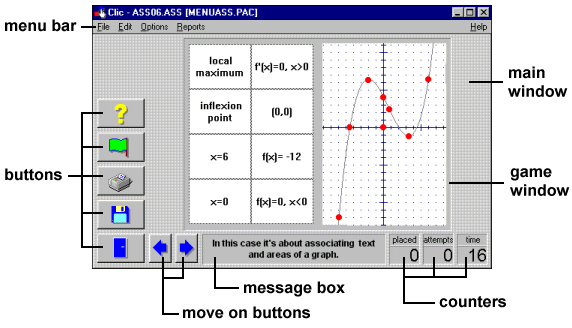
The areas of the screenClic uses a homogeneous format to present the activities which is split into different areas:
The message box always appears in the lower part of the screen. The activities may have up to two messages; one that appears at the beginning and another that is only shown when the activity has been solved. The game window is the central area where the activity is carried out. According to the mode that is being used, the contents are usually shown in one or two grids, made up of a variable number of rows and columns. The counters show the number of attempts, number placed and the time taken. These always appear to the right of the message box. The buttons allow the student to access various functions: leave the programme (door), open another activity pack (diskette), do the activity again (green flag), ask for help (question mark), print the screen, change the type of puzzle or consult additional information. The buttons can be placed on the left or at the top of the game window. The move on buttons only appear when a pack is being used, and allow the user to move to the next or previous activity. The main window gathers together all the parts and can have different colours, shades or background images. The menu bar, always at the top of the main window (as in all Windows applications), allows access to the different functions for creating and modifying activities. When designing the activities or packs it can be decided whether to show or hide some of these elements from the user.
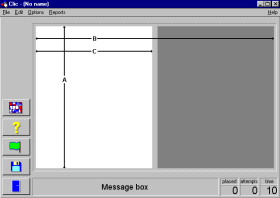
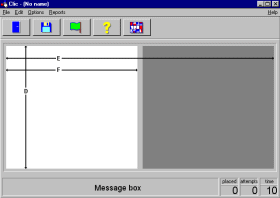
The screen dimensionsThis is an especially complicated point when designing activities that will be used on other computers. PCs do not have a single screen resolution, they allow the user to select from different options: 640x480, 800x600, 1024x768, etc. An activity made with images that appear perfectly on a monitor configured to 800x600 may be shown cut off or deformed on a screen configured to 640x480.A decision has to be made before starting to design an application with Clic: if we make the application for monitors with a 640x480 resolution we can guarantee that everyone will be able to see the activities as designed, while if we work with a 800x600 resolution, we will have a larger useable surface but we will limit the number of users that will be able to see it correctly. In newer computers the 800x600 is usual, but this configuration is not possible in some older machines and they always work with a 640x480 resolution. It is absolutely inadvisable to design activities in higher resolutions (1024x768 etc.). Few users use these configurations and we will almost certainly have problems in guaranteeing that the activities will be correctly seen outside the computer where they have been created. These are the maximum recommended sizes for the images and text boxes in Clic activities:
All of these dimensions have been calculated taking into account that the Windows 95/98 task bar covers a strip at the bottom of the screen. The E and F values are also applicable to the screens with buttons on the left if all the buttons are hidden or if only one button is visible.


|