Text activitiesThese types of activity consist of completing, ordering, correcting or identifying parts of a text document presented in a single window. Before starting to study them, it is a good idea to clarify some of the terms that we shall use:
- The body of the text is the base of the activity, the material that the student will interact with. All the body of the text has the same size, font and style attributes.
- The line of text concept is relative. Clic distributes the lines automatically according to the length of the words and the width of the game window. A text that occupies a determined number of lines in the edit activity window could take up a lot more in the game window, according to the width given to grid A (in fact, there is only one grid in text activities) in activity options. If the text needs more lines than those allowed by the game window, a vertical scroll bar automatically appears which allows moving up and down the text.
- In contrast, the paragraph concept is very clear. Hard returns always separate one paragraph from another. Hard returns are represented by the symbol in the edit activity window to help distinguish between automatic line returns and changes of paragraph.
- Boxes can be inserted within the body of the text. Boxes are rectangles of various sizes where a text, an image or any type of multimedia resource can appear. As in all Clic activities, images and multimedia content are called up by writing their name within curved brackets.
- Targets are certain parts of the text that have been marked as special areas on which the student has to interact. A target can be a word, a sentence, a letter or a whole paragraph, according to the type of exercise than we want to create. All text activities should have at least one target. In the case of fill in blanks type activities, the targets can have many special attributes, as we will see later on.
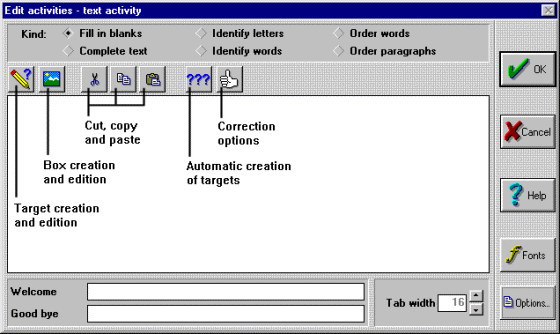
- The correction of text activities can be done in two ways: correcting the user's answers as they are written (immediate evaluation), or waiting for the user to finish the exercise and click on a button at the bottom of the game window (deferred evaluation). The characteristics of the Clic activities that we have seen so far (associations, puzzles, word searches...) can be controlled by one or two edition screens. The complexity of text activities makes it necessary to use various buttons to access the functions that define their behaviour, as shown in the image below:
The best way to discover the workings of text activities is to open the Clic "demo" and examine the examples there. Note that there are 6 different types: Fill in blanks, complete text, identify letters or words an order words o paragraphs. In the following pages the characteristics of these variations and the function of each button in the edit window are explained.


|